
Toshiba e-STUDIO series · Everyday office
Toshiba e-STUDIO entry colour copiers
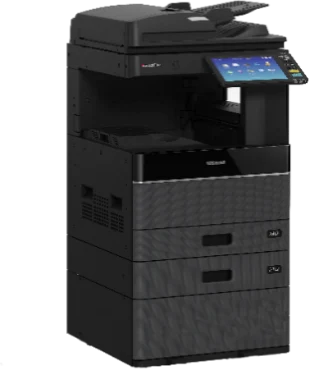
Two A3 colour machines at 20 and 25 pages a minute, with a 10.1 inch touch panel and automatic two-sided printing.
Supplied and installed by Outsource Digital. No prices are published: WhatsApp us for a quote.
Key features
- Colour printing, copying and scanning on A4 and A3
- 10.1 inch touch panel
- Prints on both sides of the page automatically
- Optional document feeder scans up to 73 pages a minute
- Print from a USB stick or by email
Who it suits
A small or medium office that wants colour on A4 and A3 at a moderate volume, without the cost of a faster machine.
Specifications
| Control panel | 26 cm (10.1 inch) multi-touch colour panel |
|---|---|
| Duplex (both sides) | Automatic, A5R to A3, 60 to 163 g/m² |
| Paper trays | 250-sheet cassette and 100-sheet bypass |
| Maximum paper | 2,900 sheets with options |
| Colour modes | Auto-colour, colour, twin colour and black-and-white |
| Document feeder | Reversing feeder, up to 73 pages a minute (300 dpi) |
Specifications from Toshiba's published product information.
Models in this series
| Model | Speed | Paper | Colour | Functions | Paper capacity |
|---|---|---|---|---|---|
| e-STUDIO2021AC | 20 pages a minute (A4), 10 on A3 | A3 | Colour | Print, copy, scan, optional fax | 250-sheet tray plus 100-sheet bypass; up to 2,900 sheets with options |
| e-STUDIO2521AC | 25 pages a minute (A4), 12 on A3 | A3 | Colour | Print, copy, scan, optional fax | 250-sheet tray plus 100-sheet bypass; up to 2,900 sheets with options |
Installed and serviced by Outsource Digital
We match the entry colour series to an everyday office: floor-standing colour machines at 20 to 25 pages a minute on A4, that also print and copy on A3. The other series we suggest for an everyday office are the entry black-and-white, office black-and-white and office colour.
Choosing between the e-STUDIO2021AC and e-STUDIO2521AC
On A4, the e-STUDIO2021AC prints 20 pages a minute and the e-STUDIO2521AC 25. Fax is an option on both. Each holds up to 2,900 sheets with options.
Installation and service
Whichever entry colour model you choose, we connect it to your network and set up scan-to-email and scan-to-folder.
Outsource Digital delivers your entry colour copier, sets it up and shows your staff how to use it, and our own technicians then look after it under a service agreement.
That agreement pays for parts, labour and call-outs and includes toner and other consumables, but not paper.
You can rent it month to month or on a longer-term agreement through APEX Rental Finance, or buy it outright.
WhatsApp us roughly how many pages you print a month and how much of it is colour, and how often you need A3. We will tell you whether the e-STUDIO2021AC or e-STUDIO2521AC suits you and quote to rent, lease or buy.
Also useful: multifunction office copiers, office phone solutions, network and fibre installations and CCTV cameras.
Ask us about the Toshiba e-STUDIO entry colour copiers
WhatsApp us and we will reply with the information or a quote.
Or phone 011 466 8510 (WhatsApp, opens in a new tab)
Monday to Thursday, 08:00 to 16:30; Friday, 08:00 to 15:30